Экспорт метрик Mikrotik в Prometheus

Для удобного и наглядного мониторинга роутеров Mikrotik можно использовать Grafana. Для этого настроим опрос роутера из Docker-контейнера, который в свою очередь будет отдавать метрики в Prometheus.
В микротике необходимо создать нового пользователя:
/user group add name=mktxp_group policy=api,read
/user add name=mktxp_user group=mktxp_group password=mktxp_user_password
Также проверяем, что сервис API активен (IP - Services).
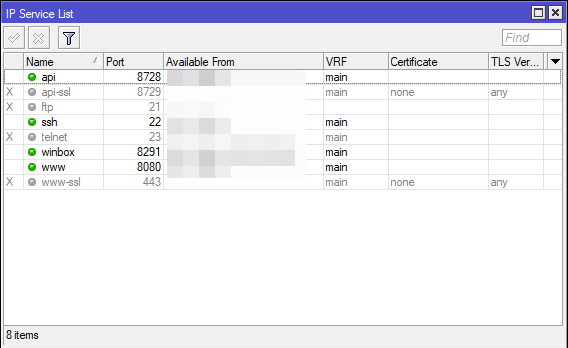
Создаём на сервере файл конфигурации mktxp/mktxp.conf
- mktxp.conf
[new-router]
    enabled = True    # turns metrics collection for this RouterOS device on / off

    hostname = 192.168.1.1    # RouterOS IP address
    port = 8728    # RouterOS API / API-SSL service port

    username = mktxp_user    # RouterOS user, needs to have 'read' and 'api' permissions
    password = mktxp_user_password

    use_ssl = False    # enables connection via API-SSL servis
    no_ssl_certificate = False    # enables API_SSL connect without router SSL certificate
    ssl_certificate_verify = False    # turns SSL certificate verification on / off

    installed_packages = True    # Installed packages
    dhcp = True    # DHCP general metrics
    dhcp_lease = True    # DHCP lease metrics

    connections = True    # IP connections metrics
    connection_stats = False    # Open IP connections metrics

    pool = True    # Pool metrics
    interface = True    # Interfaces traffic metrics

    firewall = True    # IPv4 Firewall rules traffic metrics
    ipv6_firewall = False    # IPv6 Firewall rules traffic metrics
    ipv6_neighbor = False    # Reachable IPv6 Neighbors

    poe = True    # POE metrics
    monitor = True    # Interface monitor metrics
    netwatch = True    # Netwatch metrics
    public_ip = True    # Public IP metrics
    route = True    # Routes metrics
    wireless = True    # WLAN general metrics
    wireless_clients = True    # WLAN clients metrics
    capsman = True    # CAPsMAN general metrics
    capsman_clients = True    # CAPsMAN clients metrics

    user = True    # Active Users metrics
    queue = True    # Queues metrics

    remote_dhcp_entry = None    # An MKTXP entry for remote DHCP info resolution (capsman/wireless)

    check_for_updates = False    # check for available ROS updates
    interface_name_format = comment
[default]

# The section below contains the latest default parameters introduced by MKTXP
# For organizational purposes, you can move these parameters to the [default] section
[new_default_parameters]
    routing_stats = False
    module_only = False
    ipv6_route = False
    health = True
    connection_stats = False
    plaintext_login = True
    dhcp_lease = True
    dhcp = True
    ipv6_neighbor = False
    installed_packages = True
    ssl_check_hostname = True
    gre = False
    use_ssl = False
    bgp = False
    pool = True
    connection_stats_destinations = False
    ipv6_firewall = False
    lte = False
    capsman_clients = True
    neighbor = True
    w60g = False
    wireless_clients = True
    check_for_updates = False
    firewall = True
    switch_port = False
    no_ssl_certificate = False
    ipsec = False
    certificate = False
    kid_control_dynamic = False
    wireguard_peers = False
    monitor = True
    connections = True
    capsman = True
    public_ip = True
    container = False
    routerboard = False
    ipip = False
    enabled = False
    user = True
    kid_control_assigned = False
    interface_with_default_name = False
    bridge_vlan = False
    ssl_certificate_verify = False
    interface = True
    eoip = False
    wireless = True
    dns = False
    poe = True
    queue = True
    bfd = False
    route = True
    ipv6_pool = False
    netwatch = True
    hostname = localhost
    username = user
    password = password
    credentials_file = ""
    ssl_ca_file = ""
    remote_dhcp_entry = None
    remote_capsman_entry = None
    address_list = None
    ipv6_address_list = None
    custom_labels = None
    interface_name_format = name
    port = 8728
docker-compose.yml:
version: "3"

services:
  mktxp:
    restart: on-failure
    image: ghcr.io/akpw/mktxp:main
    volumes:
      - './mktxp/:/etc/mktxp/'
    ports:
      - "0.0.0.0:49090:49090"